| |
Syllabus |
Schedule | Homework & Assignments | Resources | Final
AD 309 |
Maya: 3D Modeling and Animation |
HOMEWORK AND ASSIGNMENTS
Assignment 1: In Motion
Using a variety of basic animation and deformation tools, create a scene that incorporates the four animation principles (anticipation, follow through, secondary action, and squash and stretch). Incorporate rigidbody and softbody dynamics into the scene. I encourage you to use this assignment to begin your work towards your final project. You will need to turn in your project (that directory) as well as a rendered video (approx 30 seconds, 720 x 480. .mov or .avi).
Keep your lighting and texturing basic, and focus your creative energy on the orchestration of movement in your scene. Do not use rigging, but rather use hierarchical grouping and constraints in combination with keying in the timeline in order to control movement. Remember to approach your animation modularly - ie, layering in more detailed movements after you have established your basic blocking. Be sure to cache dynamics simulations regularly and bake simulations once you are satisfied with the action.
Assignment: Project Description/ Blog
Write: your 400 word (at least) description of your final project should describe in detail the environment and animation you wish to create. Remember: this is a virtual world you are creating so any limitations on scale and sophistication of the space (even the direction of gravitational pull) should be very conscious choices. You aren't limited by money - so don't make generic material choices!
Give explicite, direct references (the names of the artists, set designers, designers, etc) in your description to designers, architects, or artists who work in a similar vien. Add at least 2 - 3 images (photographs or stlls) from outside sources (books, digital images, magazine images) to this description that provide clear illustration of the overall style, color scheme, lighting scheme, and general 'feel' that you are going for. Include these elements:
• Are you looking for collaborators? If so, on which aspects of the project?
• Include your final video from Maya I (if applicable) as well as 2-3 renders from that piece if you wish to continue with that environment.
• Describe the feel of the environment, ie, is the space contemporary or futuristic or rustic? Within that genre, got into specifics about the context. Set the scene for us. This should read something like the opening of a script or a stage setting.
• Describe the materials - ie, wood, metals, plastic, glass, etc. Be specific! Velvet vs felt, granite vs lava rock, etc. Be prepared to discuss/ defend your material choices - expecially if you are an industrial design major.
Overall I am looking for you to be original + thoughtful here and to genuinely take chances. Again, because you are designing this yourself, there is no reason why your environments or design objects should look 'generic'. They should look like they come from you, as the artist/ designer who is an up and coming author and artistic director.
MoCap - Motion Capture Tutorial:
- Webpage: for mocap tutorial: http://www.evl.uic.edu/sjames/mocap/ (goto Tutorial - Basic menu)
- Content: Tue session will be...
- Introduction to Mocap & EVL Mocap Studio
- Basic operation of system
- Post-processing of Mocap data
- Pipeline for Mocap & Maya workflow
- Location: BATCAVE, Science and Engineering Laboratories West (SELW 1032) (see image below) - Just north of the 842 West Taylor St. ERF building, Chicago IL 60607
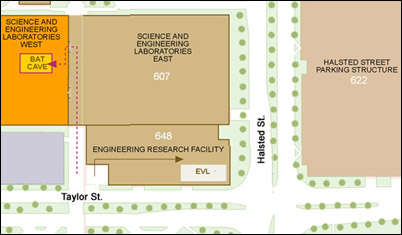
- There is a parking facility on the northeast corner of Taylor and Halsted
Blog Homework: Scene Illustrations / Sketches
Create (2) full color, polished sketches of your character (or your project's main focus if is not a character) and (3) sketches of your scene. Five (5) 2D illustrations are due in all. Illustrate the front and side of your character/ object. illustrate the top, front, and side of your scene/ environment. Use this assignment to fully conceptualize your project's look and elements. Make use of your actual textures in your sketches. Turn these images in by posting them to the maya blog. You've got a week - so these illustrations should look portfolio-ready (ie, ready to present in your portfolio). Drawing your characters in bind pose. You may use photoshop, hand drawing, illustrator, Maya, and whichever other software you'd like to create these images.
Assignment 2: Particle Motion
Create a short motion sequence (1 minute min length) using dynamics. This work can be applied towards your final project development. Make sure to include some of the following Dynamics techniques that have been introduced since the last assignment: nParticles, nCloth, Soft Bodies, Rigid Bodies, Fields, and particle Collisions, etc. Some tips for success:- build up the layers of your effects one at a time, test early and often, make sure when running your dynamics to always start at the beginning of your timeline, and always set it to Play Every Frame, cache your dynamics effects! Complete a real render of this - as shown in class - not a playblast. Give yourself plenty of time for the rendering - using the renderfarm is highly suggested. Hand in both your project folder and your .avi or .mov file.
Assignment 3: Rigged Motion System
Finesse your character's (or object's) skeleton rig and use it to make a fully rendered animation of 45 seconds or more. This should be a scene from your final project. Use Set Driven Keys and Inverse Kinematics. One of the objectives of this assignment is to get you to think through the unique movement requirements that your character/ object will have and to make sure that you develop a rig system that suits those requirements. Make sure to design your rig in a way that you can really use it! Also, skin your geometry to the rig. For the critique day you will need to:
1. Demo your animation rig from a Maya scene file: show us how the controls you make work and how they function to control the skeleton in a sophisticated way.
2. Show us your 45+ sec lit, textured + fullly rendered animation: inventively portray an action - ie, not just a generic walk cycle.
FINAL PROJECT
A short animation, depending in length on complexity (3 to 5 minutes), including sound. Further specifications to be discussed individually and in the class. Be sure to render this at at least DV res (ie, 720 x 480 dpi) and at 30 frames per second.
|
